
Mobile-First: Why Your Phone Load Speed Matters Most — Sacramento
Google judges your site by its phone experience, and speed feeds directly into site health and authority. Here is what we do about it on both build types — and where WordPress has real limits.
Written for business owners in Sacramento and the surrounding region — Roseville, Folsom, Elk Grove, Davis, and the greater Sacramento Valley.
Google evaluates your site primarily as it appears on a phone. Not as it appears on your desktop monitor, where you built it and where it looks fine.
That is mobile-first, and it has a consequence people underestimate: mobile performance can affect your site health and your authority, not just whether a visitor waits around. A slow phone experience is not only a conversion problem. It is a technical signal.
What actually makes a phone page slow
In practice, on small-business sites, it is almost always the same short list.
Unoptimized images. A photo straight off a phone camera can be four or five megabytes. Ten of those on a page is a page nobody on a cellular connection will wait for. This is the single most common cause and the easiest to fix.
Plugin bloat. Every plugin can load its own scripts and stylesheets on every page, whether that page uses it or not. A site with thirty plugins is often loading twenty of them for no reason.
Layout that shifts while loading. When text loads, then an image pushes it down, then a banner pushes it again, that instability is measured and counted against you — and it is why people tap the wrong thing and leave.
Render-blocking resources. Scripts and stylesheets that must finish downloading before anything appears on screen. The page is ready; the browser is not allowed to show it yet.
What we do about it
On Navigator Launch — coded builds. These are the fastest sites we produce. Honestly, the best performance we have seen from any websites. There is no plugin layer, no theme framework loading code the page never uses, and no builder overhead — only the code the page actually needs. If performance is your priority, this is the build.
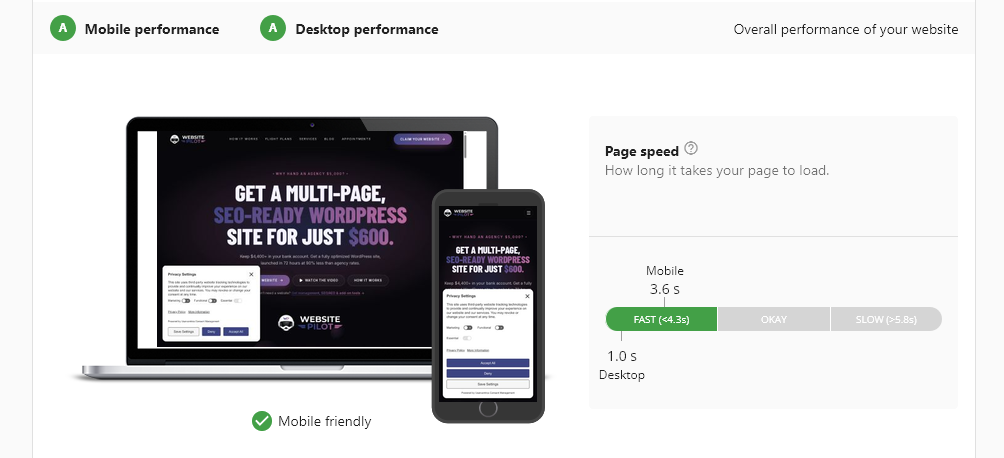
That report is our own Navigator Launch build — grade A on both mobile and desktop, one second to load on desktop, and inside the fast band on mobile. Scores move as content and networks change, but that is the class of result a coded build makes reachable.
On Autopilot Launch — WordPress builds. We are going to be straight with you: WordPress has real limitations on mobile speed. It is a general-purpose engine carrying a theme and plugin architecture, and that architecture has a cost. Anyone telling you a stock WordPress site will match a hand-built coded site on phone performance is selling you something.
What we do inside those limits:
- Every image is optimized during our build process for fast loading — correctly sized, compressed, and served in modern formats. This is the biggest lever available on WordPress and we pull it on every build.
- Restrained plugin use. We add what the site needs to work and nothing for decoration.
- Layout reserved up front so the page does not jump while it loads.
- Lazy loading for media below the fold, so the first screen is not waiting on content nobody has scrolled to.
The result is a WordPress site that loads quickly on a phone — built for fast load times on every device — while being clear-eyed that a coded build will go faster.
The test that costs you nothing
Open your own site on your phone, on cellular data, not on your office wifi. Count the seconds until you can read something and tap something. Then try to call the business from that screen without pinching to zoom.
That is the experience Google is grading, and it is the experience your customer is having.
Where this fits
Speed is not a one-time task. Images get added, plugins get installed, content grows. That is part of what Website Management at $99/month covers: hosting, daily backups, security, updates, and keeping the site built to WCAG 2.1 AA accessibility standards, with Google Search Console and Analytics configured so you can actually see how the site is performing.
We build and maintain sites for businesses in Sacramento and nationwide.
See flight plans or book a call.
What this looks like in Sacramento
Sacramento rewards businesses that show up properly, because a surprising number of established local competitors still have not. It is common here to find a well-reviewed, decades-old business with no sitemap, no structured data, and a site that was last touched in 2016. That gap is an opening.
The regional shape matters too. Sacramento is a hub surrounded by fast-growing suburbs — Roseville, Folsom, Elk Grove, Rocklin, Davis — and people in those cities search by their own city name, not by "Sacramento." A single page that says "Sacramento area" captures far less than a set of pages built for the cities you actually drive to.
We also see strong results here from review velocity, because in a market this size a steady flow of recent reviews stands out quickly.
We work with businesses across the greater Sacramento region and nationwide.
A complete, search-ready website in 48 hours.
Autopilot Launch is $600 one-time — a multi-page WordPress site with competitor keyword research built into every page, a sitemap for proper indexing, and an llms.txt file so AI search tools can read and cite your business.